tammikuu 25, 2026



 Written by Guardian
 Streaming your favorite movies, TV shows, and live content has never been easier. One of the most popular platforms for this is Stremio, a versatile media center that organizes your content and gives access to add-ons for movies, series, and live TV. In 2025, Stremio continues to be a top choice for cord-cutters, and when paired with a reliable IPTV provider like GuardianTV, it becomes a complete entertainment hub.
In this guide, we’ll walk you through installing Stremio on Firestick and Android TV, setting it up properly, and integrating GuardianTV for sports and live channels.
Stremio is a streaming platform that allows you to organize and watch your favorite content from various sources in one interface. You can:
Watch movies and TV shows with subtitles
Use add-ons to access live TV, IPTV streams, and on-demand content
Keep track of new releases and upcoming episodes
While Stremio itself doesn’t provide content, it supports add-ons that pull streams from multiple sources. Pairing it with GuardianTV, one of the fastest and most cheap IPTV providers in 2026, allows you to watch live sports, news, and global channels directly through Stremio.
GuardianTV stands out as a premium IPTV service with:
10x fast servers ensuring zero buffering
Access to hundreds of live sports channels including football, NBA, UFC, cricket, and more
Compatibility with Firestick, Android TV, Smart TVs, and mobile devices
Affordable subscription packages with flexible plans
By integrating GuardianTV into Stremio, you can combine your on-demand streaming with live sports and TV channels for a complete entertainment experience.
Installing third-party apps like Stremio on Firestick requires enabling apps from unknown sources. Here’s the step-by-step process:
Go to Settings on your Firestick.
Navigate to My Fire TV → Developer Options.
Turn on Apps from Unknown Sources.
Confirm the warning message.
On your Firestick home, go to the Search icon.
Type Downloader and select it.
Install the Downloader app from the Amazon App Store.
Open the Downloader app.
Enter the official Stremio APK URL: https://www.stremio.com/downloads

Click Go to download the APK.
Once downloaded, click Install.
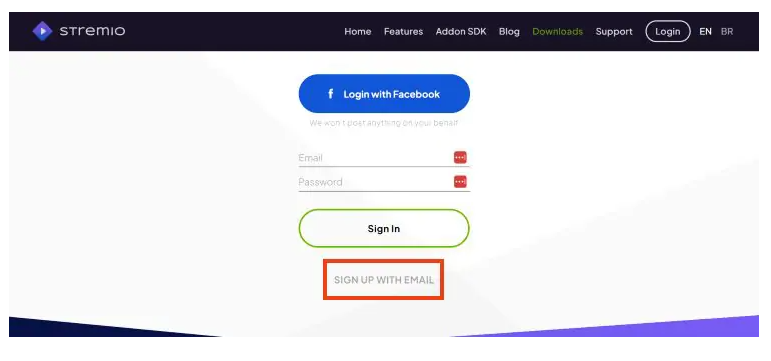
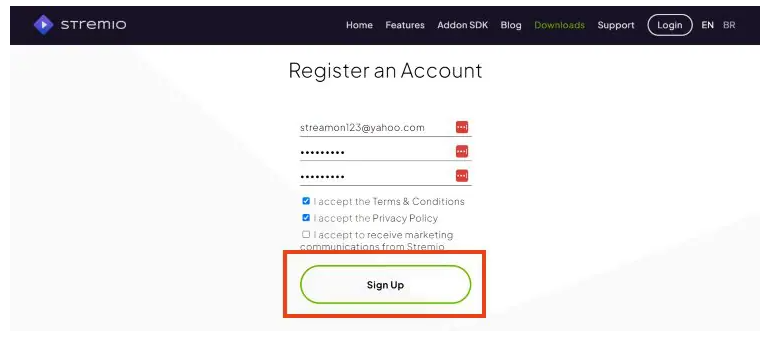
Android TV devices generally allow easier app installation:
Open the Google Play Store on your Android TV.
Search for Stremio.
Click Install and wait for the installation to complete.
If Stremio isn’t available in your region:
Download the Stremio APK from the official site using a browser.
Transfer the APK to your Android TV via USB or cloud storage.
Open the APK and install it.
Once Stremio is installed, you can integrate live IPTV channels from GuardianTV using supported add-ons:
Open Stremio and go to Add-ons.
Search for IPTV add-ons compatible with M3U links.
Enter your GuardianTV M3U link provided with your subscription.
After adding, live sports channels and global content will appear in Stremio.
Now, you can stream football, NBA, UFC, cricket, and much more directly through Stremio without opening multiple apps.
Ensure your internet speed is at least 25 Mbps for HD and 50 Mbps for 4K streams.
Clear cache in Stremio periodically to avoid slowdowns.
Use a VPN to secure your connection and access geo-restricted streams. GuardianTV works perfectly with VPNs for worldwide access.
Keep Stremio and add-ons updated for the latest content and features.
All-in-One Entertainment: Watch on-demand movies, TV series, and live sports in one app.
Zero Buffering: GuardianTV fast servers ensure high-quality streaming, even during big sports events.
Multi-Device Support: Works on Firestick, Android TV, Smart TVs, and mobile devices.
Affordable: No need for multiple subscriptions—GuardianTV offers full coverage at reasonable rates.
Customizable: Add and remove channels and content according to your preference.
Installing Stremio on Firestick or Android TV is straightforward and, when paired with GuardianTV, turns your device into a powerful media hub. Whether you’re a sports fan, movie lover, or just want an all-in-one streaming solution, this combo delivers reliability, high-quality HD/4K streams, and access to global content.
Stop juggling multiple apps and subscriptions—set up Stremio with GuardianTV and enjoy seamless entertainment from your living room or on the go.
tammikuu 25, 2026
tammikuu 24, 2026
tammikuu 15, 2026
tammikuu 14, 2026

GuardianTV tarjoaa luotettavaa ja laadukasta IPTV-suoratoistoa, jossa on laaja valikoima suoria kanavia, elokuvia ja tilattavaa sisältöä. Suoratoistaminen on älykkäämpää - missä ja milloin tahansa.
(Hanki välitöntä apua WhatsAppin kautta)
(asiakaspalvelu ja tuki)
© 2026 GuardianTV - All Rights Reserved
📢 Important: Please save our backup domain guardiantv.co.uk