Januar 25, 2026



 Written by Guardian
 The following tutorial will show you how to install Stremio on Firestick, Fire TV, Android TV, and any device.
Stremio is one of the most popular applications for viewing movies and TV shows in high-definition quality. This app is continually updated with new features with the latest version being V1.6.12.
Stremio is a free media center application that works very similarly to Kodi and Plex. The Stremio application can be installed on Android TV/Google TV Boxes, Windows, Linux, Mac, phones, tablets, and more. You can also use a web browser if you prefer.

We can install 3rd party add-ons that allow for the streaming of on-demand movies, TV shows, Anime, live channels, and more.
After adding your favorite add-ons, you can browse the unique interface that Stremio offers and find the streams you are looking for without having to worry about buffering.

In the guides below we will show you how to register for a free Stremio account as well as a step-by-step installation guide.
In order to use the Stremio app, we must first register for a free account on the official website.
For anonymity purposes, we recommend using an anonymous email address such as StartMail that will ensure your identity is secure.
1. Visit the official Stremio Website and click Login in the upper right-hand corner.

2. Select Sign up with Email.

3. Enter an email address and password and click Sign Up.

4. Your account is now created!

Continue reading to learn how to install the Stremio application and login with your account.
We can now continue with installation for our preferred media device such as the Amazon Firestick or Android TV/Google TV systems.
1. You must first install the Downloader app on your device. If you haven’t done this, refer to our tutorial below. Downloader by AFTVNews can be installed on both Fire TV and Android devices.
Downloader Guide

2. Launch Downloader and click the URL bar.

3. Type the code for the GuardianTV which is 250931 und klicken Sie auf Los.

5. Scroll down and locate the Stremio app for Fire TV & Android TV boxes. Click Download.
6. Klicken Sie auf Installieren.

7. Click Done.

8. Click Delete to remove the installation file.

9. Click Delete again.

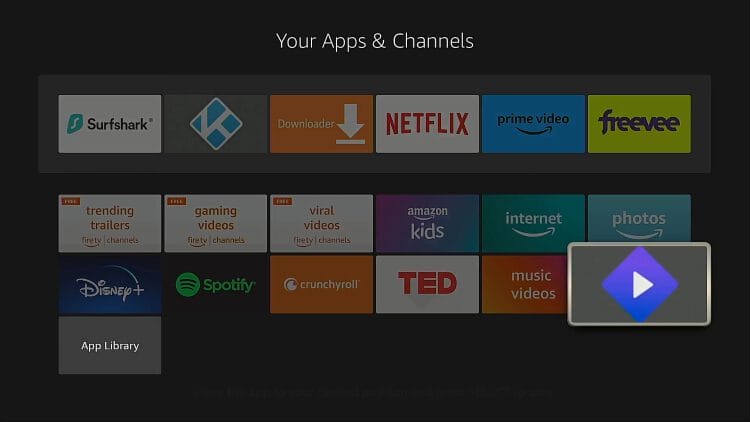
10. Then locate Stremio in your installed apps and launch it.
Important: if you’re prompted to set storage permissions you must click Allow.
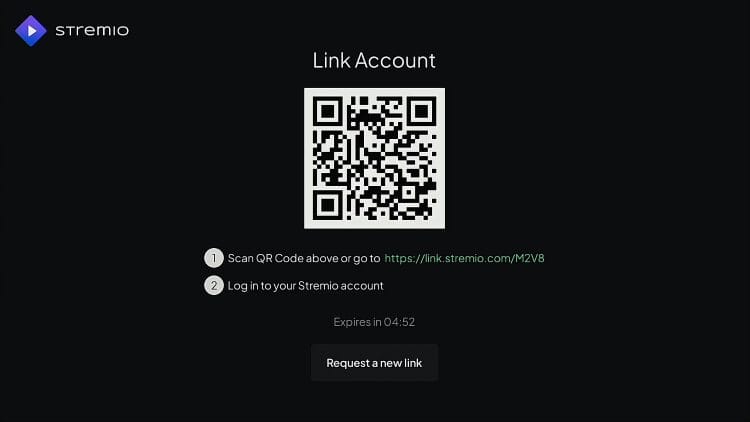
11. You must now link your Stremio account with the application. You can login with the QR code or open the designated link in a browser on your phone, tablet, or computer.
12. You have successfully installed Stremio on your Firestick or Android TV device.

Here’s a short video that shows how to fix choppy video playback in Stremio.
There are several features available with the Stremio application that will make your experience even better.
The categories offered by Stremio include Discover, Library, Add-ons, and Settings. Inside the ‘Discover’ category you will find subcategories for movies and TV shows.

Within the settings menu are numerous options to cater to your personal preference. Users can adjust the Interface including Language and theme options.

There are also various video playback options available. Here we can adjust audio settings and more.

Users can also integrate an External Video Player for use instead of the Default ExoPlayer. If you choose to do this, we suggest using MX Player or VLC Player.

The best way to find all the features associated with this app is by testing it on your device.
It’s impossible for GuardianTV to determine whether these unverified applications hold the proper licensing.
Stremio by itself is a legal media player, as it can be installed from verified app stores like Google Play. However, some content provided by third-party add-ons does not have the proper copyright licensing.
If you use this application, make sure to only view titles available within the public domain. The end-user is responsible for all content accessed through apps such as Stremio.
You can view Stremio’s terms and conditions page for more details on legality.
Many love the Stremio application for its usability and high definition content that is all built into the fabulous interface we see on just about every device.
With syncing capabilities, you can access your Stremio favorites no matter where you are and this makes it extremely easy to use.
If you are a Kodi user that is bored with the layout of this popular application, you may want to consider Stremio that appears more updated and might even have better integration options for live streaming, on-demand, and more.


GuardianTV bietet zuverlässiges, hochwertiges IPTV-Streaming mit einer breiten Palette an Live-Kanälen, Filmen und On-Demand-Inhalten. Streamen Sie intelligenter - jederzeit und überall.
© 2026 GuardianTV - All Rights Reserved
📢 Important: Please save our backup domain guardiantv.co.uk